How AI Is Rewriting Architecture Decision Records: Nodes vs. Pixels in a React and Rust WebAssembly PoC
A practical Proof of Concept comparing the exact same sign-up interface built with React DOM nodes and Rust WebAssembly canvas pixels—analyzing code complexity, AI agent effort, CPU, GPU memory, and platform trade-offs.
In the previous installment of this series, How AI Is Rewriting Architecture Decision Records: The Case for WebAssembly Adoption, we examined why generative AI workloads—untrusted agentic code execution, bursty serverless inference requiring sub-millisecond cold starts, and WASI-NN / WebGPU hardware bridges—have flipped the enterprise ADR in favor of WebAssembly. Coupled with the earlier articles on enterprise Rust adoption and monorepos with microservices, a clear pattern emerged: AI coding agents dramatically compress the engineering cost of writing systems-level Rust and compiling it to WebAssembly.
That velocity raises a tempting follow-up question for software architects: if AI coding assistants can write thousands of lines of Rust and WebAssembly without slowing down feature delivery, why stop at backend sandboxes and compute pipelines? Should we also replace traditional HTML DOM frontends (React, TypeScript, and CSS) with Rust compiled to WebAssembly rendering directly to a <canvas>?
To answer that question with empirical data rather than whiteboard speculation, I built marcelomiyake/nodes-vs-pixels: a controlled Proof of Concept (PoC) that implements the exact same sign-up interface twice inside a single monorepo:
-
web-react(Nodes): React 19, TypeScript, and Tailwind CSS rendering standard HTML DOM nodes (<form>,<input>,<label>,<button>), prerendered at build time with inlined CSS. -
web-wasm(Pixels): Rust compiled towasm32-unknown-unknownviawasm-pack, painting every pixel of the page onto a single<canvas>inside<main>—with zero<input>,<label>, or<button>elements in the DOM.
Both frontends talk to the same Rust tonic backend over gRPC-web (application/grpc-web+proto), share the same design tokens, font, copy, and validation conformance vectors, and are verified against each other by a Playwright visual parity suite that fails if more than 0.5% of their pixels differ.
In this post, we walk through how the experiment was built, what it actually takes to replace the browser’s DOM in Rust, how many tokens and review rounds the AI agents spent on each frontend, the measured CPU and GPU memory profiles in Chrome, the pros and cons of each architecture, and how these findings refine a modern WebAssembly ADR.
Designing a controlled experiment: nodes-vs-pixels
When architectural comparisons between React and Rust/WebAssembly go wrong, it is usually because the two implementations do not actually do the same work: one app uses different fonts or spacing, skips edge-case validation, omits keyboard navigation, or mocks the network layer.
To eliminate drift between the two frontends and the backend, nodes-vs-pixels is structured as a single workspace where every contract, visual token, string, and validation vector comes from a shared source of truth:
flowchart TD
accTitle: Architecture of the nodes-vs-pixels monorepo experiment
accDescr: Shared single sources of truth for the gRPC contract, design tokens, UI copy, validation vectors, SEO metadata, and the Rust form-core crate feed into the Rust tonic backend, the React DOM frontend, and the Rust WebAssembly canvas frontend. Both frontends are deployed on Kind via Helm and audited by Playwright pixelmatch parity tests, Lighthouse, and SonarQube Cloud.
subgraph Shared ["1. Shared Single Sources of Truth"]
direction TB
Contracts["proto/signup/v1/signup.proto (gRPC-web contract)<br/>+ crates/form-core (Shared Rust validation rules)"]
Assets["design/tokens.json + inter-latin.woff2<br/>+ spec/copy.json, validation-cases.json & line-breaks.json<br/>+ seo/site.json & inject.mjs"]
Contracts ~~~ Assets
end
subgraph Runtime ["2. Deployed Services on Kind (Helm)"]
direction TB
React["web-react (:8081 — DOM Nodes)<br/>React 19 + TypeScript + Tailwind CSS<br/>Prerendered HTML + native <input> controls"]
Wasm["web-wasm (:8082 — Canvas Pixels)<br/>Rust compiled to WebAssembly<br/>Single <canvas> inside <main>"]
Backend["backend (Rust / tonic)<br/>Unary gRPC & gRPC-web server"]
React -->|gRPC-web| Backend
Wasm -->|gRPC-web| Backend
end
subgraph Harness ["3. Verification & Measurement Harness"]
direction TB
E2E["e2e (Playwright + pixelmatch)<br/>Side-by-side keyboard & mouse driver<br/>≤0.5% state pixel diff & ≤100px step diff"]
Audit["Lighthouse (Mobile & Desktop)<br/>+ Chrome DevTools CPU/GPU profiling<br/>+ SonarQube Cloud coverage"]
E2E --> Audit
end
Shared --> Runtime
Runtime --> Harness
Repository layout and shared contracts
| Path | Role in the Experiment |
|---|---|
proto/ |
Defines signup.v1.SignupService/SignUp (SignUpRequest, SignUpResponse, FieldViolation, Field, and ViolationCode). |
design/ |
tokens.json and the subset inter-latin.woff2 font shared by both frontends. web-react generates CSS custom properties from tokens.json; web-wasm generates Rust constants from it in build.rs. |
spec/ |
copy.json (all labels, placeholders, hints, and error messages), validation-cases.json (conformance test vectors executed by both Rust and TypeScript test suites), and line-breaks.json (line-break opportunities recorded from Chrome at min-content width). |
seo/ |
Single source of SEO metadata (site.json) injected into both web-react/dist/client and web-wasm/dist at build time by inject.mjs. |
crates/form-core/ |
Pure Rust validation crate (225 lines in src/lib.rs) linked directly into both the backend and web-wasm. |
backend/ |
Rust tonic + tonic-web server serving both native gRPC and HTTP/1.1 gRPC-web on a single port, validating submissions with form-core and issuing UUIDv4 account IDs. |
web-react/ |
React 19, TypeScript, Vite, and Tailwind CSS v4 frontend using @connectrpc/connect-web for gRPC-web calls, build-time SSR prerendering (scripts/prerender.mjs), and inlined CSS. |
web-wasm/ |
Rust crate compiled to WebAssembly (wasm32-unknown-unknown) that lays out, paints, and handles all interaction on a single <canvas> element. |
e2e/ |
Playwright end-to-end test suite driving both frontends simultaneously and verifying pixel-level visual parity via pixelmatch. |
deploy/ |
Local Kubernetes cluster configuration (Kind), Nginx reverse-proxy templates (serving static assets and proxying /signup.v1.SignupService/ to the backend), and Helm chart. |
How the PoC was built and verified
Following the harness and loop engineering practices from earlier posts, the repository was built with a two-model authoring and review loop:
-
Authoring (Claude Code with Claude Opus 5.5): Every change was authored on a short-lived branch as a Conventional Commit of at most 1,000 changed lines (lockfiles aside), with
cargo clippy(both native and--target wasm32-unknown-unknownwith-D warnings),cargo test, ESLint, TypeScript type-checking, and Vitest suites passing. -
Adversarial commit review (Codex with
gpt-6.1-solatmediumreasoning effort): Before any branch fast-forwarded tomain, Codex reviewed each commit locally:1
codex review --commit <sha> -c model='"gpt-6.1-sol"' -c model_reasoning_effort='"medium"'
Claude Code resolved every valid finding in the commit it concerned (or documented why Chrome’s actual browser behavior proved a finding wrong) and re-ran the review until zero findings remained.
-
Static analysis and cluster gates: Both Rust crates and the TypeScript projects were analyzed for test coverage and code smells on SonarQube Cloud (
make sonar), deployed to a local Kind Kubernetes cluster via Helm (make deploy), verified with Playwright (make e2e), and audited with Lighthouse on mobile and desktop (make lighthouse).
Visual parity: Nodes vs. Pixels side by side
Can a Rust WebAssembly module painting onto an HTML <canvas> visually match a Tailwind CSS + React DOM page down to individual pixels?
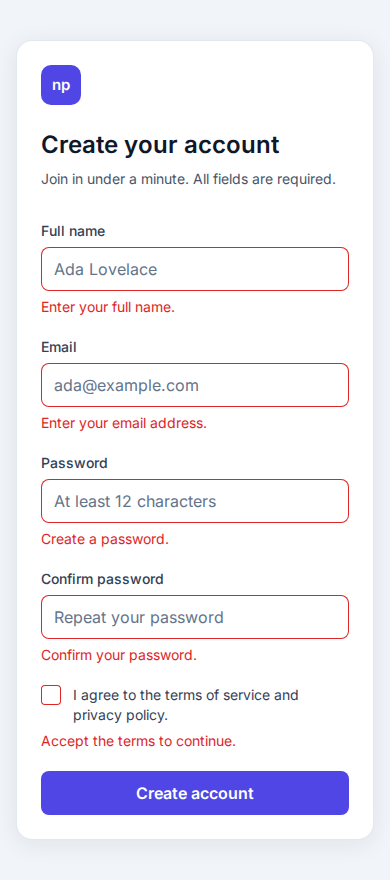
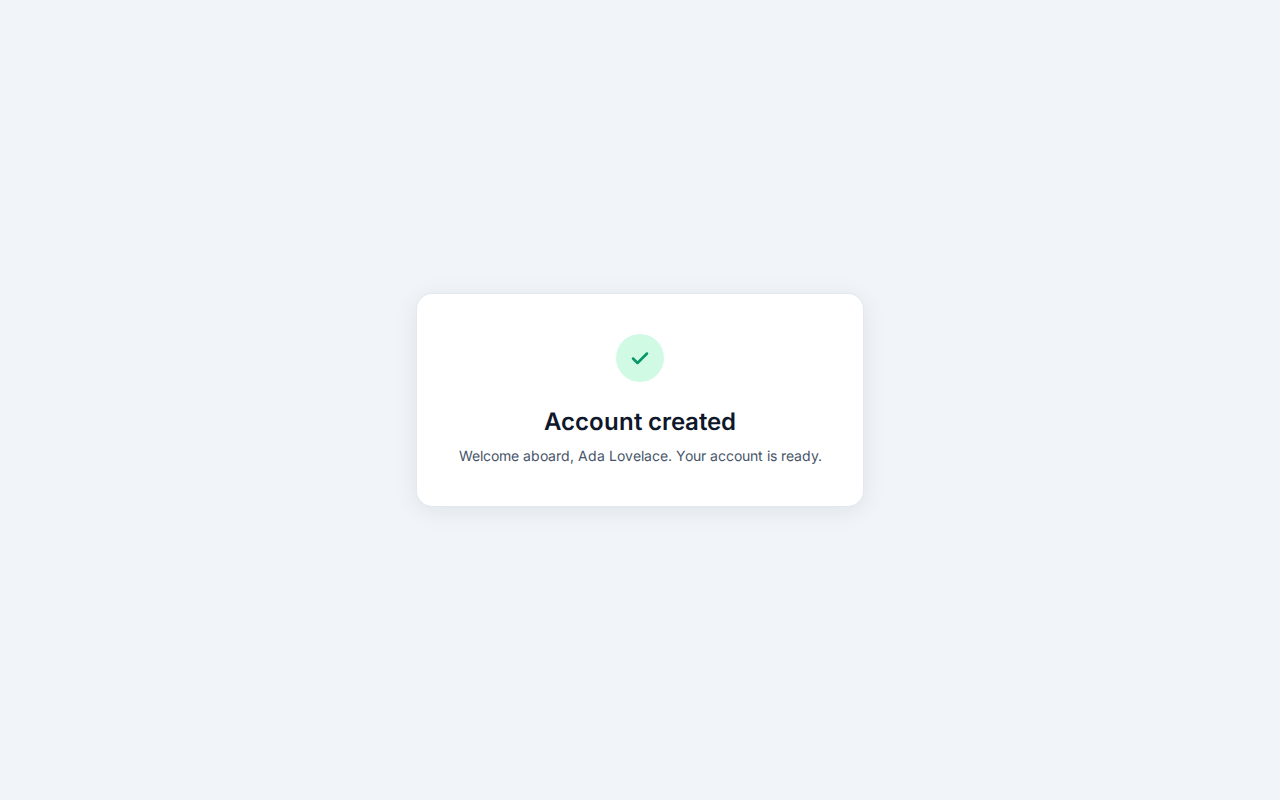
Yes. In e2e/tests/parity.spec.ts, Playwright opens both http://localhost:8081/ (web-react) and http://localhost:8082/ (web-wasm) at desktop (1280×800) and phone (390×844) viewports across three states—Empty, Errors, and Success—and compares full-page PNG screenshots using pixelmatch (threshold: 0.1). The test fails if more than 0.5% (MAX_DIFF = 0.005) of pixels differ. Across interactive steps in e2e/tests/form.spec.ts, at most 100 pixels (SAME = 100) may differ (and in the benchmark check run, at most 69 pixels differed across steps 4 to 6).
Here are the actual screenshots captured from the Kind cluster by make screenshots:
| State & Viewport |
web-react (DOM Nodes) |
web-wasm (Canvas Pixels) |
|---|---|---|
| Empty (Desktop, 1280×800) |  |
 |
| Empty (Phone, 390×844) |  |
 |
| Validation Errors (Desktop) |  |
 |
| Validation Errors (Phone) | 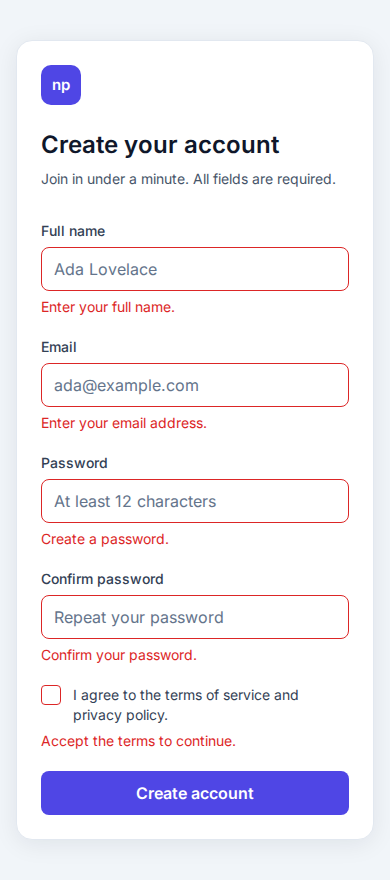 |
 |
| Account Created (Desktop) | 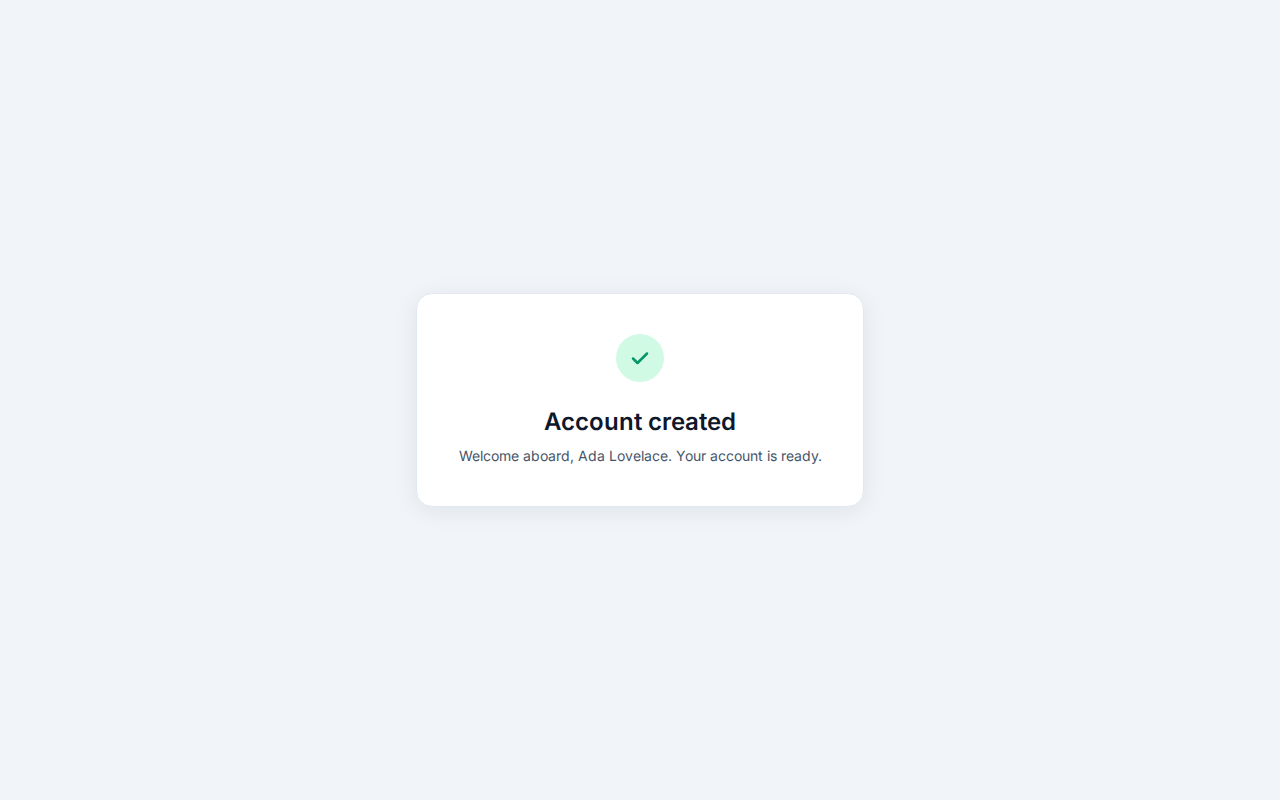 |
 |
| Account Created (Phone) |  |
 |
Testing a page that has no DOM controls
A revealing detail in the E2E suite is e2e/tests/form.spec.ts, which asserts the entire DOM structure of the WebAssembly app:
1
2
3
4
5
6
7
8
9
10
11
12

test('the canvas app is one canvas that takes all input', async ({ page }) => {
  await open(page, APPS[1].url);
  expect(await page.evaluate(() => [...document.body.querySelectorAll('*')].map((element) => element.tagName))).toEqual([
    'MAIN',
    'CANVAS',
    'SCRIPT',
  ]);
  const canvas = page.getByRole('main').locator('canvas');
  await expect(canvas).toHaveAttribute('tabindex', '0');
  await expect(canvas).toHaveAccessibleName('Create your account');
  await expect(page.locator('input, button, label, select, textarea')).toHaveCount(0);
});
Because web-wasm has zero <input>, <button>, or <label> elements, Playwright cannot locate controls by ID or role inside the canvas. Instead, the Pair harness in e2e/tests/apps.ts queries the bounding box of a selector on the React page (this.react.locator(selector).boundingBox()) and clicks the exact same (x, y) coordinates and presses the exact same key sequences on both pages. Because both apps compute identical layouts, every click, double-click word selection, Tab traversal, Control+Backspace word deletion, and scroll adjustment lands on the exact same pixel in both tabs.
What it takes to replace the DOM: 680 lines of React vs. 7,528 lines of Rust
When you write <input type="password" id="password" /> in React, you are writing one line of JSX that delegates decades of systems engineering to Blink/Chrome: box layout, font shaping, bidirectional text, grapheme segmentation, word movement, undo/redo history coalescing, clipboard security, focus rings, caret blinking, and scroll anchoring.
When you replace the DOM with a single <canvas>, your application becomes the browser engine.
Early in the experiment (commit 76337f2), web-wasm painted the card on a canvas while positioning transparent native HTML <input> and <button> elements over the canvas (overlay.rs) to let Chrome handle text editing and focus. To test a true pixels-only architecture, commits 45e5963 and 0018b68 removed the native overlay completely and moved all input, editing, focus, clipboard, and scrolling into Rust.
Comparing the source footprint of the two frontends shows the immediate architectural tax of leaving the DOM behind:
| Subsystem / Responsibility |
web-react (TypeScript / TSX / MJS) |
web-wasm (Rust) |
|---|---|---|
| Build-Time Codegen / SSR / Theme |
prerender.mjs (30) + theme.mjs (56) = 86 lines
|
build.rs (176) + lib.rs (33 prod / 47 test) + style.rs (41) = 250 prod lines (297 total) |
| Form Validation Rules |
validation.ts = 119 lines
|
Shared from crates/form-core/src/lib.rs (185 prod / 40 test) |
| Form State Machine & Copy |
useSignUpForm.ts (77) + copy.ts (18) = 95 lines
|
form.rs = 203 prod lines (353 total with tests) |
| gRPC-Web Client Transport |
api.ts (@connectrpc/connect-web) = 52 lines
|
grpc_web.rs (custom 5-byte frame & trailer codec) = 157 prod lines (319 total) |
| UI Components / Layout & Painting |
SignUpForm.tsx (95), TermsCheckbox.tsx (70), TextField.tsx (66), SuccessPanel.tsx (32), BrandMark.tsx (12), App.tsx (19), main.tsx (21), entry-server.tsx (13) = 328 lines
|
layout.rs (452 prod / 250 test) + scene.rs (321 prod / 465 test) = 773 prod lines (1,488 total) |
| Text Shaping, Bidi & Line Breaking | Delegated to browser DOM / CSS engine (0 lines) |
text.rs = 672 prod lines (949 total) |
| Single-Line Editor, Selection & Masking |
Delegated to native <input> (0 lines) |
editing.rs = 625 prod lines (905 total) |
| Unicode Emoji Backspace State Machine |
Delegated to native <input> (0 lines) |
backspace.rs = 152 prod lines (202 total) |
| Page-Wide Undo / Redo Coalescing | Delegated to browser page history (0 lines) |
history.rs = 95 prod lines (184 total) |
| Keyboard, Mouse, Focus & Scroll Engine | Delegated to browser event loop (0 lines) |
input.rs (1,173 prod / 895 test) + web.rs (763 prod) = 1,936 prod lines (2,831 total) |
| Frontend Total (Production / All Lines) | 680 production lines (+ 378 test lines = 1,058 total) | 4,863 production lines (+ 2,665 inline test lines = 7,528 total) |
Even for a single card with four text inputs, one checkbox, and one submit button, the Rust <canvas> frontend requires ~7.1x more production code (4,863 vs. 680 lines) than the React DOM frontend. Looking inside the web-wasm modules shows why:
1. Subpixel text rendering and whole-pixel snapping (web.rs, layout.rs, scene.rs)
By default, an HTML <canvas> has a transparent backdrop (alpha: true), which forces Chrome to use grayscale antialiasing instead of the subpixel LCD antialiasing used on opaque DOM elements. In web-wasm/src/web.rs, the canvas context must be initialized with { alpha: false } so font stems match the DOM’s subpixel rendering. Furthermore, CSS snaps borders and the 1px text caret to device pixel boundaries; web-wasm had to replicate Chrome’s whole-pixel coordinate snapping (commit c60f8fc) and half-leading rounding (((line_height - ascent - descent) / 2.0).floor()) so baselines never drift by a single pixel.
2. Bidirectional text and contextual glyph shaping (text.rs)
The HTML Canvas 2D API only exposes measureText(text).width for a whole string—it does not tell you where each character or caret stop sits inside a shaped word. In web-wasm/src/text.rs:
-
char_boundsruns the Unicode Bidirectional Algorithm (unicode_bidi::BidiInfo) to reorder mixed left-to-right (Latin) and right-to-left (Arabic, Hebrew) visual runs while returning character bounds in logical order. - Because ligatures, kerning pairs, Arabic cursive joining, and Indic vowel signs change a grapheme cluster’s width depending on its neighbors,
run_boundsmeasures each cluster in the context ofCONTEXT = 2adjacent grapheme clusters on either side (and measures standalone combining marks against a dotted circle◌,\u{25CC}, just as HarfBuzz/Chrome does).
3. Chrome’s Backspace state machine for emoji and combining marks (backspace.rs)
In Chrome, pressing Backspace vs. Delete is asymmetric:
- If you type
efollowed by a combining acute accent (\u{0301}),Backspacedeletes only the accent (leavinge), whereasDeletefrom before the character deletes the whole grapheme cluster. - However, if the caret is after a multi-codepoint emoji—such as a skin-tone modifier (
👍🏽), a keycap (1️⃣), a regional indicator flag pair (🇺🇸), a subdivision tag sequence (🏴), or a Zero-Width Joiner (ZWJ) family sequence (👨👩👧, 5 code points)—Backspacedeletes the entire emoji sequence at once.
To match Chrome’s behavior, web-wasm/src/backspace.rs implements an 11-state finite automaton over Unicode properties from icu_properties (VariationSelector, RegionalIndicator, EmojiModifierBase, ExtendedPictographic, CanonicalCombiningClass).
4. Password word-boundary masking, undo coalescing, and scroll anchoring (editing.rs, history.rs, input.rs)
-
Password security in word navigation: In
editing.rs, a password field masks each grapheme cluster with a bullet (•,\u{2022}) and treats the entire value as one single word when pressingCtrl+ArrowLeft/Alt+ArrowLeft—otherwise word-jump shortcuts would reveal where spaces or punctuation sit inside a masked password. Equally,Event::CopyandEvent::Cutare blocked on password fields. -
Page-wide undo/redo: Chrome maintains one shared undo stack for the whole page rather than one per
<input>. Inhistory.rs, consecutive typing merges into an open undo step,Backspacemerges only after anotherBackspace,Deletemerges into any open step, andPaste/Cutrecord isolated steps. -
Scroll anchoring (
Anchor): On a short phone viewport (390×300), tabbing out of an invalid field above the viewport inserts an error message that pushes the rest of the card down. Chrome’s CSS Scroll Anchoring adjustsscrollYso the currently visible control stays fixed on screen;web-wasm/src/web.rsandlayout.rshad to implement an explicitAnchorsolver to matchMath.round(scrollY)pixel for pixel.
What the AI agents spent: tokens, time, and review rounds
Lines of code are only a proxy for effort. The two agents’ session logs measure it directly.
Claude Code wrote the whole repository in a single session: Claude Opus 5.5 at xhigh effort, 11 hours of wall-clock time (7.3 of them active), 1,148 API calls, and nine automatic context compactions. Claude Code estimated the session’s cost at $110.52. Assigning each API call to the area its tool calls touched—paths such as web-react/ or web-wasm/, commands such as pnpm --filter web-react or wasm-pack—splits that session as follows:
| Area | API Calls | Output Tokens | All Tokens | Active Time | Share of the $110.52 |
|---|---|---|---|---|---|
web-react |
94 | 0.14 M | 22 M | 0.6 h | ~$10 |
web-wasm |
663 | 0.98 M | 150 M | 3.7 h | ~$65 |
| Both frontends (e2e and parity tests, builds of both) | 266 | 0.44 M | 59 M | 2.3 h | ~$26 |
Shared (contract, tokens, form-core, backend, SEO, deploy) |
125 | 0.12 M | 22 M | 0.7 h | ~$10 |
| Total | 1,148 | 1.67 M | 254 M | 7.3 h | $110.52 |
Output tokens include the model’s thinking. All tokens adds the input each call reads: every call re-reads the whole context (about 220,000 tokens on average, mostly from the prompt cache), so effort grows with the number of calls. Active time counts the time from each call to the next, including the builds and tests it ran, up to 5 minutes.
Codex reviewed the commits in 104 codex review runs (GPT-6.1 Sol at medium effort). Each run’s log names the commit it reviewed, and a commit was reviewed again after every fix, so the reviews are review rounds:
| Area | Reviews | Commits | Input Tokens | Output Tokens | Review Time |
|---|---|---|---|---|---|
web-react |
13 | 6 | 2.3 M | 11 k | 0.2 h |
web-wasm |
73 | 23 | 26.2 M | 157 k | 1.9 h |
| Shared, tests, and docs | 18 | 15 | 2.1 M | 12 k | 0.2 h |
| Total | 104 | 44 | 30.6 M | 180 k | 2.3 h |
Four findings stand out:
- The canvas frontend cost about 7x the React frontend to write: 7x the API calls and output tokens, 6.8x the tokens, and 6x the active time—close to its 7.1x production-code ratio. Splitting the “both frontends” work evenly gives 3.5x; counting all of it against the canvas, whose parity those tests check, gives 9.5x.
-
Most of that cost arrived after the native inputs were removed: Until I pointed out that the first canvas version (commit
76337f2) still relied on HTML<input>elements laid over the canvas,web-wasmhad used 50 M tokens against React’s 18 M (2.8x). Rebuilding everything those inputs did—carets, selection, undo, scrolling, and the clipboard—took another 101 M tokens, plus 32 M on work across both frontends, mostly the parity tests. -
Reviews diverged even further: 11x the tokens and 12x the time: Canvas commits needed more rounds (3.2 on average vs. 2.2, and 9 for
feat(web-wasm): break canvas text where Chrome does), and each review read twice as much (358,000 tokens vs. 178,000). -
Review was cheap next to authoring: Codex used an eighth of Claude Code’s tokens (31 M vs. 254 M) and ran on a ChatGPT Plus subscription with no per-token cost; the account’s use of its weekly Codex limit rose from 1% to 26% during the session. With both agents counted,
web-wasmtook 177 M tokens andweb-react24 M—7.3x.
The logs also expose one gap in the review loop: every commit made in the session has at least one Codex review except 0018b68 (refactor(web-wasm): remove the overlay of native controls), which no review log names.
(Method: each API call is attributed from its tool calls, and a call without tool calls inherits the previous call’s area. Claude Code’s context compactions, about 2% of its tokens, and later documentation-only sessions are excluded.)
Empirical results: Lighthouse, CPU, and the GPU memory tax
Once both frontends achieved visual and behavioral parity on the Kind cluster, how did they perform?
1. Bundle sizes, Lighthouse scores, and the accessibility score paradox
Both frontends are served from Nginx containers with identical font and SEO assets:
-
web-reactbuild output:19 KiBprerenderedindex.html(with14 KiBof Tailwind CSS inlined),340 KiBminified JS bundle (index-pOAmR297.js), and the sharedinter-latin.woff2font—155 KiBtotal compressed transfer size reported by Lighthouse. -
web-wasmbuild output:2.2 KiBindex.html,36 KiBwasm-bindgenJS glue (web_wasm.js),288 KiBoptimized WebAssembly binary (web_wasm_bg.wasm), and the shared font—178 KiBtotal compressed transfer size reported by Lighthouse.
Running make lighthouse against both deployed services produced these results (from the lighthouse/*.json reports it writes locally; the directory is git-ignored, so the reports are not in the repository):
| Lighthouse Metric |
web-react Desktop |
web-wasm Desktop |
web-react Mobile |
web-wasm Mobile |
|---|---|---|---|---|
| Performance Score | 100 | 100 | 100 | 99 |
| Accessibility Score | 100 | 100 | 100 | 100 |
| Best Practices Score | 100 | 100 | 100 | 100 |
| SEO Score | 100 | 100 | 100 | 100 |
| First Contentful Paint (FCP) | 0.3 s | 0.2 s | 1.2 s | 0.8 s |
| Largest Contentful Paint (LCP) | 0.4 s | 0.4 s | 1.7 s | 2.0 s |
| Total Blocking Time (TBT) | 0 ms | 0 ms | 10 ms | 110 ms |
| Cumulative Layout Shift (CLS) | 0 | 0 | 0 | 0 |
| Main-Thread Work | 0.1 s | 0.1 s | 0.3 s | 0.4 s |
| Total Byte Weight | 155 KiB | 178 KiB | 155 KiB | 178 KiB |
Look closely at the Accessibility Score: 100 on web-wasm. How did a page with zero <input>, <label>, or <button> elements score 100/100 on Lighthouse Accessibility?
Because web-wasm renders <main><canvas id="app" tabindex="0" aria-label="Create your account"></canvas></main>. Automated axe/Lighthouse rules check whether every element present in the DOM has a valid role, landmark, contrast, and accessible name. Since the <canvas> sits inside <main> and has an aria-label, the automated linter reports zero violations—even though a real screen-reader user hears only “Create your account” and cannot perceive a single text field, error message, or button inside the canvas. Automated accessibility scores validate DOM nodes; they are blind to UIs trapped inside pixels.
2. Runtime CPU benchmarks across 6 user-journey steps
Lighthouse only measures initial page load. To measure runtime CPU and memory during real interaction, both apps were driven through the exact same six steps in headless Chrome 156 against the Kind deployment on Linux (Intel Core i7-8750H, NVIDIA GeForce GTX 1060, 1280×800 viewport, 5-run median per app, fresh browser instance per run):
- Load: Load the page and wait 3 seconds after first paint.
- Idle: Sit untouched for 10 seconds.
-
Idle, field focused: Press
Tabto focus the first field (fullName) and wait 10 seconds. -
Empty submit: Press
Enterto trigger required-field errors on all 5 fields and wait 1 second. -
Typing: Type all four fields (63 characters at 50 ms per keystroke) with
Tabbetween them, thenTabandSpaceto check the terms box. -
Sign-up: Press
Enterto submit over gRPC-web to the Rust backend and wait 1 second.
Here is the median CPU time in milliseconds (web-react / web-wasm) with GPU rasterization at 1× device pixel ratio:
| Step | Main Thread (React / Wasm) |
Script (React / Wasm) |
Layout & Style (React / Wasm) |
Page Renderer Process (React / Wasm) |
GPU Process (React / Wasm) |
|---|---|---|---|---|---|
| 1. Load (3 s) | 73 / 64 ms | 37 / 24 ms | 3.6 / 0.5 ms | 120 / 100 ms | 70 / 60 ms |
| 2. Idle, unfocused (10 s) | 0.3 / 1.9 ms | 0 / 0.3 ms | 0 / 0 ms | 0 / 0 ms | 20 / 20 ms |
| 3. Idle, field focused (10 s) | 5.7 / 24 ms | 0 / 16 ms | 0 / 0 ms | 10 / 40 ms | 50 / 100 ms |
| 4. Empty submit (1 s) | 6.2 / 8.3 ms | 3.1 / 5.6 ms | 0.6 / 0.1 ms | 10 / 20 ms | 10 / 10 ms |
| 5. Typing 63 chars | 130 / 178 ms | 27 / 117 ms | 11.6 / 0.4 ms | 220 / 290 ms | 180 / 410 ms |
| 6. Sign-up (gRPC-web) | 12 / 10 ms | 5.1 / 5.5 ms | 1.8 / 0 ms | 10 / 10 ms | 10 / 20 ms |
Five structural findings stood out across every run:
-
Initial load costs slightly less main-thread time in Wasm (
64 msvs.73 ms): Because the canvas page has only 65 total DOM nodes (<head>metadata +<main><canvas><script>) and no CSS layout tree to compute,web-wasmspends24 msin script and0.5 msin layout/style, versus37 msin script (React bundle execution and hydration) and3.6 msin layout/style forweb-react. -
Typing costs the canvas app 4.3x more script time and 2.3x more GPU time: In
web-react, typing a character updates React state and lets Chrome’s Blink engine dirty only the text run inside that<input>box (27 msscript,11.6 mslayout/style,180 msGPU across 63 keys). Inweb-wasm, every single keystroke re-runs layout and repaints the entire1280×856<canvas>from Rust via Canvas 2D FFI calls (__wbg_set_font_…,__wbg_set_fillStyle_…,fillText), consuming117 msof script time and410 msof GPU process time. -
Focusing an input burns idle CPU and GPU in the canvas app: When an
<input>is focused inweb-react, Chrome blinks the native caret itself with 0 ms of JavaScript (5.7 msmain thread,50 msGPU over 10 seconds). Inweb-wasm, a500 mstimer (BLINK_MSinweb-wasm/src/web.rs) wakes up twice a second and repaints the whole canvas just to toggle the 1px caret—spending16 msof script,24 mson the main thread (4.2x React), and100 msin the GPU process (2x React) while the user isn’t touching a key. -
High-DPI (
2×Retina) displays scale GPU cost for pixels, not nodes: When running at a2×device pixel ratio,web-wasmmust rasterize 4x as many pixels. Its GPU process time jumps from100 msto160 msduring focused idle (Step 3) and from410 msto640 msduring typing (Step 5), whereasweb-reactstays nearly flat at60 msand190 ms. -
Without a GPU, software rasterization punishes the canvas app severely: On machines or headless environments using software rasterization, Chrome paints the
<canvas>on the page’s main thread. Under software rasterization, typing 63 characters inweb-wasmtakes700 msof main-thread time againstweb-react’s130 ms(5.4x slower), and810 msof renderer process CPU against230 ms. Even sitting idle with a focused field takes96 msevery 10 seconds against React’s5.6 ms(17x more main-thread work).
3. Memory and the hidden GPU pixel buffer tax
At first glance, Chrome’s standard tab memory metrics make the two apps look nearly identical in RAM:
Memory & DOM Metric (GPU Raster, 1×) |
After Loading (React / Wasm) |
After Signing Up (React / Wasm) |
|---|---|---|
Page Renderer Private Memory (/proc/<pid>/smaps_rollup) |
17.5 / 17.7 MiB | 19.8 / 21.1 MiB |
| JavaScript Heap Used (post-GC) | 2.67 / 1.52 MiB | 3.27 / 1.64 MiB |
WebAssembly Linear Memory (ArrayBuffer) |
— / 1.19 MiB | — / 1.19 MiB |
| Combined JS + Wasm Heap | 2.67 / 2.71 MiB | 3.27 / 2.83 MiB |
| DOM Nodes | 114 / 65 | 66 / 65 |
| JS Event Listeners | 162 / 26 | 157 / 26 |
On the CPU heap side, web-wasm is remarkably compact: its JS glue heap (1.52 MiB) plus its Rust linear memory (1.19 MiB, which never grew during the entire test) total 2.71 MiB—matching web-react’s 2.67 MiB JS heap after load and beating web-react (2.83 MiB vs. 3.27 MiB) after sign-up, with one-sixth the event listeners (26 vs. 162).
However, standard tab memory footprints hide where the canvas’s pixels actually live. The <canvas> backing store covers the entire page at the screen’s physical resolution:
Canvas Buffer = page width × page height × DPR2 × 4 bytes
For a 1280×856 page, a single uncompressed RGBA buffer is 4.18 MiB at 1× and 16.72 MiB at 2×. Inspecting Chrome’s memory-infra dump after typing a name reveals the real cost inside the GPU process:
GPU / Pixel Allocation (memory-infra dump) |
At 1× DPR (React / Wasm) |
At 2× DPR (React / Wasm) |
|---|---|---|
| Skia GPU Resources (in GPU process) | 8.5 / 52 MiB (6.1x) | 8.5 / 147 MiB (17.3x) |
| Shared Images (in GPU process) | 10–12 / 15–20 MiB | 10 / 53 MiB (5.1x) |
| Canvas Buffer (in page renderer) | — / 12.5–16.7 MiB | — / 50 MiB |
(Note: memory-infra categories can overlap, so rows do not sum linearly.)
- At
1×, Skia’s GPU resources in the GPU process are 6.1x larger for the canvas app (52 MiBvs.8.5 MiB). - At
2×(standard on modern laptops and phones), Skia’s GPU resources jump to147 MiBforweb-wasmvs.8.5 MiBforweb-react—a 17.3x multiplier—while Chrome holds50 MiBin the renderer for a canvas whose raw pixels are16.7 MiB. - Without GPU acceleration (software rasterization), that pixel buffer moves into the tab’s own RAM, raising
web-wasm’s private renderer memory after load to22.7 MiBvs. React’s18.6 MiB(a4.1 MiBdelta matching the4.2 MiB1280×856canvas buffer at1×).
Pros and cons: React DOM nodes vs. Rust WebAssembly pixels
Synthesizing the engineering implementation and the runtime telemetry yields a clear trade-off matrix between the two approaches:
Option A: React + TypeScript + Tailwind CSS (web-react — DOM Nodes)
Pros
-
Free browser platform integration: By rendering semantic
<form>,<input>,<label>, and<button>nodes, the application automatically inherits Input Method Editors (IME) for Chinese, Japanese, and Korean (CJK), mobile on-screen virtual keyboards (type="email",type="password"), password managers (1Password, Bitwarden, iCloud Keychain, Chrome Autofill viaautocomplete), spell checking, context menus, and native text selection. -
True accessibility semantics: Screen readers (NVDA, JAWS, VoiceOver) traverse every label, field hint (
aria-describedby), invalid state (aria-invalid), and live error alert (role="alert") without custom assistive bridges. -
Compositor efficiency during interaction: Chrome only repaints the dirty rectangle of the active
<input>when typing (27 msscript vs.117 ms) and Chrome blinks the text caret itself with0 msof script overhead. -
Constant GPU memory across DPI scales: Skia GPU memory stays flat at
8.5 MiBon both1×and2×displays. -
7x smaller application codebase:
680lines of production TypeScript/TSX vs.4,863lines of production Rust, because text shaping, bidi layout, undo history, and keyboard/mouse state machines live inside the browser. It also took about a seventh of the AI agents’ authoring tokens (22 M vs. 150 M) and an eleventh of their review tokens.
Cons
-
Cross-language validation duplication: Because the backend is in Rust (
crates/form-core) and the frontend is in TypeScript (web-react/src/validation.ts), validation rules must either be implemented in both languages and kept in sync via shared conformance vectors (spec/validation-cases.json)—where subtle standard-library differences surface, such asString.prototype.trimin JS not matching Rust’s UnicodeWhite_Spacestr::trim(requiring a custom\p{White_Space}trimmer invalidation.ts)—or compiled to a small Wasm helper module. -
Higher DOM listener and GC heap growth: Attaches
162JS event listeners (vs.26) and grows the JS heap from2.67 MiBto3.27 MiBafter form interaction.
Option B: Rust + WebAssembly + <canvas> (web-wasm — Pixels)
Pros
-
Zero-drift code sharing with a Rust backend: Links
crates/form-coreandproto/signup/v1/signup.protodirectly into both thetonicserver and the client binary. Client and server execute the exact same compiled Rust functions for Unicode code-point counting, whitespace trimming, and password symbol classification. -
Deterministic layout and flat linear memory: Bypasses CSS cascade quirks and DOM layout recalculation (
0.4 msvs.11.6 ms), keeps WebAssembly linear memory completely flat at1.19 MiB, and decoupled core logic (layout.rs,scene.rs,editing.rs,input.rs,backspace.rs,history.rs) can be unit-tested natively withcargo testin milliseconds without spinning up a browser. -
Slightly lighter and faster first load on desktop:
64 msvs.73 msof main-thread time and a0.2 svs.0.3 sFirst Contentful Paint, with minimal HTML and no DOM hydration.
Cons
-
Loss of essential browser and OS input capabilities:
-
No IME or mobile virtual keyboard: A
<canvas>has no input method binding, so users cannot compose CJK characters via an OS IME, and tapping a field on a phone does not open the on-screen keyboard. - No autofill, password managers, or spellcheck: Browser credential managers and address autofill cannot detect or populate fields painted as pixels.
-
Inaccessible to screen readers: Assistive technologies see only a single
<canvas aria-label="Create your account">element; the internal fields, checkboxes, and validation errors are invisible to the accessibility tree. -
No browser context menu or page text selection: Right-clicking does not offer Cut/Copy/Paste/Translate, and static text on the card cannot be selected or searched with
Ctrl+F. -
Incomplete OS keyboard conventions: Implements Linux and macOS editing shortcuts, but lacks Windows-specific word-jump boundaries and macOS Emacs-style Control bindings (
Ctrl+A,Ctrl+E,Ctrl+K). -
Complex script shaping discrepancies: Because the Canvas 2D API only exposes whole-string widths (
measureText), scripts where HarfBuzz reorders or splits glyphs across grapheme clusters—such as Burmese, Sinhala, Kannada, and Khmer—can place the canvas caret a few pixels away from Chrome’s native DOM caret.
-
No IME or mobile virtual keyboard: A
-
Higher interaction CPU, idle drain, and 6x–17x GPU memory overhead: Repainting the canvas on every keystroke and every
500 mscaret blink consumes 4.3x more script time while typing, burns CPU/GPU while idle, spikes to700 msmain-thread time without a GPU, and consumes147 MiBof Skia GPU resources on a2×screen. -
Production debugging opacity in Chrome DevTools: Unless rebuilt without
wasm-opt(--no-opt, which nearly doubles binary size), CPU flame charts show anonymouswasm-function[209]frames, and Chrome’s Memory panel shows Rust’s entire heap as a single opaquesystem / JSArrayBufferDatabuffer without per-struct allocation tracking.
How this experiment refines the 2026 WebAssembly ADR
In Part 3 of this series, we saw why AI workloads are driving WebAssembly adoption for serverless inference, edge functions, and untrusted agent sandboxes. How does nodes-vs-pixels fit into that architectural picture?
It demonstrates a crucial principle for AI-era Architecture Decision Records:
AI coding agents collapse the build-time cost of writing complex low-level software, but they do not alter the runtime physics or platform integration boundaries of the target environment.
Before AI coding assistants, no rational team would spend weeks writing 7,500 lines of Rust—complete with a Unicode Bidirectional algorithm, an 11-state emoji Backspace state machine, and a custom scroll-anchoring solver—just to render a sign-up form on a <canvas>. With Claude Opus 5.5 writing atomic commits and GPT-6.1 Sol reviewing them against a Playwright pixelmatch harness, building that engine is now astonishingly practical: the whole canvas frontend took 3.7 active hours and about $65 of Claude Code’s estimated session cost, plus 73 Codex review rounds. Practical—but still about seven times what the React frontend cost, because AI shrinks the absolute cost of a custom UI engine, not its ratio to the one the browser already ships.
Yet the fact that AI can build a custom canvas UI engine cheaply does not mean your architecture should bypass the DOM. Even with a bug-free, pixel-accurate Rust canvas implementation:
- You still pay a 17x GPU memory tax (
147 MiBvs.8.5 MiBat2×DPR) and 4.3x script CPU overhead on every keystroke. - You still break mobile virtual keyboards, CJK IME composition, password managers, and screen readers unless you re-introduce a hidden synchronized DOM overlay (the exact complexity Flutter Web had to adopt, and that commit
0018b68stripped out to test pure canvas rendering).
When to choose Nodes, Pixels, or a Hybrid Wasm Core
flowchart TD
accTitle: Decision tree for choosing between DOM Nodes, Hybrid Wasm + DOM, and Wasm Canvas Pixels
accDescr: Architectural decision tree routing standard forms and documents to HTML DOM nodes, shared domain logic or heavy local computation with form UI to a Hybrid React DOM + Rust Wasm Core, and spatial 2D/3D viewports like CAD, editors, or games to Wasm Canvas/WebGPU Pixels with a DOM overlay for text inputs and accessibility.
Q1["1. Is the primary interface a standard form, document,<br/>dashboard, or text-entry workflow?"]
DOM["Use Pure DOM Nodes (React / TypeScript / CSS)<br/>Keep layout, dirty-region compositing, IME,<br/>autofill, and accessibility in the browser engine"]
Q2["2. Do you need zero-drift Rust validation,<br/>cryptography, codecs, or client-side AI inference?"]
Hybrid["Use Hybrid DOM Nodes + Rust Wasm Core<br/>React renders native <input> elements;<br/>Rust Wasm runs form-core rules or WebGPU compute"]
Pixels["Use Wasm Pixels + HTML DOM Overlay<br/>Render spatial 2D/3D viewport in Rust + Canvas/WebGPU;<br/>delegate forms, dialogs, IME & a11y to DOM nodes"]
Q1 -->|Yes, standard UI| Q2
Q1 -->|No, infinite 2D/3D canvas, CAD, raster editor, or game| Pixels
Q2 -->|No heavy local compute needed| DOM
Q2 -->|Yes, shared Rust core or heavy compute| Hybrid
-
Choose DOM Nodes (
web-reactpattern) for forms, dashboards, content pages, e-commerce checkouts, and document workflows. Let the browser’s C++ engine handle layout, dirty-region compositing, IME, autofill, and accessibility. -
Choose a Hybrid DOM + Rust Wasm Core when you want single-source Rust business rules (like
crates/form-core), local cryptography, CRDT state synchronization, or client-side AI inference, without drawing your own text inputs. Compileform-coreto a tiny Wasm module and call it from React’suseSignUpFormhook—getting zero-drift Rust validation alongside native<input>nodes. - Choose Wasm + Canvas/WebGPU Pixels only when the core product is an infinite 2D/3D spatial surface that DOM nodes cannot represent cleanly (such as Figma, Adobe Photoshop Web, PhotoCraft, CAD modelers, or browser DAWs)—and even then, use standard HTML DOM nodes for surrounding forms, menus, and text-input overlays so mobile keyboards, IMEs, password managers, and screen readers continue to work.
Sample ADR: documenting the boundary between DOM Nodes and Wasm Pixels
Below is the companion ADR to ADR 0038 from the previous post, capturing the client-side architectural boundary proven by nodes-vs-pixels:
1
2
3
4
5
6
7
8
9
10
11
12
13
14
15
16
17
18
19
20
21
22
23
24
25
26
27
28
29
30
31
32
33
34
35
36
37
38
39
40
41
42
43
44
45
46
47
48
49
50
51
52
53
54
55
56
57
58
59
60
61

# ADR 0039: Retain HTML DOM Nodes for Standard UIs; Restrict Rust/Wasm Canvas Rendering to Spatial Viewports

## Status
Accepted (Amends ADR 0038 for Client-Side Browser Applications)

## Date
2026-10-22

## Context
Following ADR 0038 (which adopted Rust + WebAssembly for serverless AI inference and agentic sandboxing)
and our backend standardization on Rust + tonic (ADR 0035), our engineering team evaluated whether AI-assisted
development (Claude Code + Codex) makes it advantageous to unify our entire stack in Rust by replacing our
React/TypeScript/Tailwind web frontends with Rust compiled to WebAssembly rendering directly to an HTML <canvas>.

To evaluate this decision empirically, we built the `nodes-vs-pixels` Proof of Concept, implementing the exact
same sign-up form and gRPC-web client in React (`web-react`) and in Rust/Wasm on a single `<canvas>` (`web-wasm`),
verified to within 0.5% pixel parity across desktop and mobile viewports.

The PoC revealed that while AI agents enabled us to build a pixel-accurate Rust canvas renderer (4,863 production
lines of Rust vs. 680 in React) achieving 100/100 desktop Lighthouse scores:
1. Runtime interaction cost increased: Typing 63 characters took 4.3x more script time (117ms vs. 27ms) and
   2.3x more GPU time (410ms vs. 180ms) due to full-canvas repaints, plus continuous CPU/GPU wakeups every 500ms
   to blink the text caret while idle. Without hardware GPU acceleration, typing took 5.4x more main-thread time
   (700ms vs. 130ms).
2. High-DPI GPU memory multiplied: On 2x displays, Skia GPU memory rose to 147 MiB for the canvas app versus
   8.5 MiB for React (17.3x higher).
3. Platform integration broke: Rendering form controls as canvas pixels eliminated mobile on-screen keyboards,
   CJK Input Method Editors (IME), browser password managers/autofill, native spellcheck, context menus, and
   screen-reader form semantics (despite a 100/100 automated Lighthouse Accessibility score).
4. Build effort still scaled with the code: even with AI agents, the canvas frontend took about 7x the authoring
   tokens and time of the React frontend (150M vs. 22M Claude Code tokens; 3.7 vs. 0.6 active hours) and 11x its
   review tokens (26.2M vs. 2.3M Codex tokens).

## Decision
1. We will retain React, TypeScript, and Tailwind CSS (HTML DOM nodes) for all standard application interfaces,
   forms, navigation, authentication flows, and document-centric views.
2. Where client-side validation or domain logic must match our Rust backend with zero drift, we will compile
   shared pure-Rust domain crates (such as `crates/form-core`) to WebAssembly and invoke them as stateless
   functions from React hooks, keeping all visual rendering and input handling in native DOM elements.
3. We will reserve Rust + WebAssembly `<canvas>` / WebGPU rendering strictly for non-DOM spatial viewports
   (such as interactive vector/raster editors, 2D/3D visualizations, and real-time signal timelines), and any
   text entry or modal form inside those tools must delegate to an HTML DOM overlay.

## Consequences

### Positive
- Preserves full browser platform capabilities (IME composition, mobile virtual keyboards, password managers,
  autofill, and screen-reader accessibility trees) with zero custom reimplementation.
- Avoids the 17x High-DPI GPU memory overhead and 4.3x typing script penalty on form-heavy pages.
- Shares complex validation and domain invariants (`form-core`) between Rust backend and browser client via
  lightweight Wasm function calls without maintaining a 7,500-line custom UI engine.

### Negative & Mitigations
- Polyglot Frontend/Backend Boundary: Engineers and AI agents maintain TypeScript/React for UI components alongside
  Rust for backend and shared core crates.
  Mitigation: Enforce shared protobuf contracts (`proto/`), design tokens (`design/tokens.json`), UI copy
  (`spec/copy.json`), and language-agnostic conformance test vectors (`spec/validation-cases.json`) in CI.
- Automated Accessibility Blind Spots: As `web-wasm` demonstrated, Lighthouse Accessibility scores 100/100 on a
  labelled `<canvas>` with zero accessible internal controls.
  Mitigation: Our E2E Playwright harness (`e2e/`) must assert semantic DOM roles, focus management, and keyboard
  workflows directly rather than relying solely on automated Lighthouse category scores.
Key takeaways
-
AI lowers implementation cost, not runtime cost: AI coding agents (Claude Opus 5.5 + GPT-6.1 Sol review loops) make it feasible to write a 7,500-line custom layout, bidirectional text, and canvas rendering engine in Rust that matches React to within
0.5%of pixels. Only running the resulting binary against real browser telemetry reveals the147 MiB2×GPU memory footprint and4.3xtyping script cost. And AI shrinks the build cost without closing the gap: the canvas frontend still took about 7x the React frontend’s agent tokens to write and 11x to review. -
Every
<input>tag hides an iceberg of platform engineering: Replacing DOM nodes with pixels means taking personal ownership of Unicode UAX #9 bidirectional runs, UAX #14 line breaking,Intl.Segmenterdictionary word boundaries, 11-state ZWJ emoji Backspace rules, password word-boundary masking, undo coalescing, and scroll anchoring—and you still lose mobile virtual keyboards, CJK IMEs, password managers, and screen-reader semantics. -
A 100/100 Lighthouse Accessibility score does not mean a page is accessible: A single
<main><canvas tabindex="0" aria-label="...">passes automated DOM accessibility audits while presenting a black box to assistive technologies. -
Use WebAssembly for what the browser cannot do, not to reimplement what the browser already does best: Combine WebAssembly’s strengths—shared Rust domain logic (
form-core), sandboxed agent execution,WASI-NN/WebGPUcompute, and spatial 2D/3D viewports—with the HTML DOM’s strengths for forms, text entry, and accessible user interfaces.